Product updates

The latest improvements and behind-the-scenes updates from the Parim team.
July 25, 2026

Who's on shift

Know your team before you clock in.

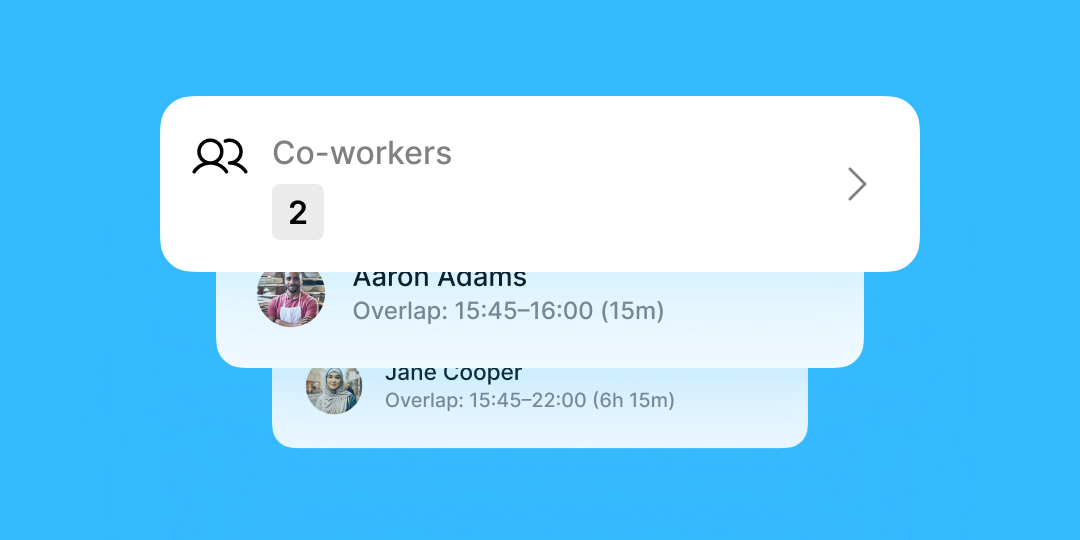
Turning up to a shift not knowing who else is on site makes coordination harder than it needs to be. Who's on Shift lets employees see exactly who they're working with — right from the Parim mobile app, before they even arrive.

What's new

  • See who's scheduled alongside you — Employees can view every colleague assigned to the same location and shift, regardless of position, department, or role.
  • Overlapping hours at a glance — Each colleague's overlapping working time is shown, so it's clear exactly when you'll be on site together.
  • Works for open and assigned shifts — Visible whether a shift is still open or already allocated and confirmed.
  • Always current — Information updates automatically as schedules change, so what staff see always reflects the live roster.
  • No extra admin — Just switch it on for your organisation, and Parim handles the rest.

Why it matters

For large frontline teams, multi-site operations, and roles where coordinating transport or logistics matters, knowing who else is on shift means staff arrive better prepared and ready to work together — without managers having to relay that information manually. It's a small addition to the app that pays off in day-to-day coordination.

Getting started

Superadmins can enable it under System Settings → Time & Attendance. Once switched on, it applies across your whole organisation — staff will see colleagues on the same shift automatically, as long as their hours overlap by at least 15 minutes. Who's on Shift is included in all Parim plans.
Learn more about Who's on shift →

Read the full help article →

June 19, 2026

Shift import

Turn a spreadsheet into a full schedule in seconds — not days.

Building schedules for large teams shift by shift doesn't scale. With Shift Import, you can upload a CSV and populate thousands of shifts at once, turning what used to take days of manual scheduling into a task that takes minutes.

What's new

  • Bulk CSV upload — Import thousands of shifts in a single file, whether you're scheduling 100 staff or 10,000.
  • Assigned or open shifts, your choice — Import shifts already assigned to named staff, or create open positions for staff to claim later — even mix both in the same file.
  • Built-in validation — Parim checks staff availability during import to prevent conflicts and double bookings, and blocks banned staff automatically, so bad data never makes it onto your schedule.
  • Clear, row-by-row reporting — Each row is processed independently: successful shifts go live, failed rows are clearly explained so you can fix and re-import just the ones that need it.
  • Schedule far ahead — Build out schedules weeks, months, or even years in advance in one upload.

Why it matters

For teams scheduling at volume — events, large security contracts, seasonal staffing — manual entry is where hours get lost and mistakes creep in. Shift Import lets one person do what used to take a team, while built-in checks catch conflicts and restricted staff before they ever hit the schedule.

Getting started

Head to Schedule → Shift Import, download the CSV template, and fill in your shift data — dates, times in 15-minute increments, and the company, location, and position exactly as they appear in Parim. Upload the file and you'll get a full import summary, plus an emailed report of what succeeded and what needs a fix. Available from the Premium plan and above, for Superadmin users.

Learn more about Shift Import →
Read the full setup guide →

June 2, 2026

Digital Employee ID Card

On-the-spot ID verification, right from the Parim app.

At large events and busy sites, "who are you and are you meant to be here?" needs a fast answer. The new Digital Employee ID Card lets staff pull up their work identification directly in the Parim mobile app — quickly verifying identity and active work status on site.

What's new

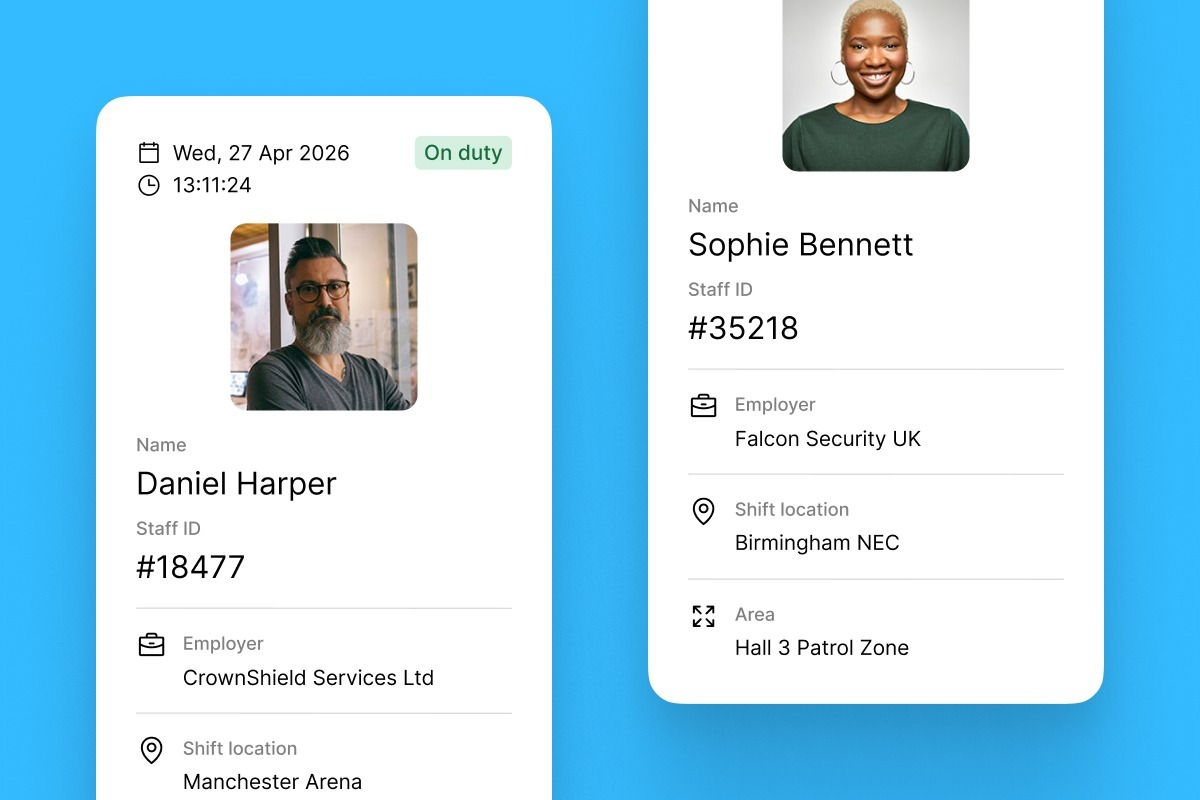
  • Employee name & picture — Pulled straight from the staff profile, so identity is easy to confirm at a glance.
  • Employer information — Company name and logo, taken from your Parim settings, so it's clear who staff work for.
  • Shift location & status — Shows the employee's current shift location and whether they're On Duty or Off Duty, based on live shift and clock-in data.
  • Current date & time — Displayed in real time, so the card can't be mistaken for a stale screenshot.
  • Zero manual work — Everything on the card is auto-generated from existing staff profiles and live shift data. Nothing to fill in or maintain.

Why it matters

For clients, security leads, or site managers who need quick reassurance that someone is who they say they are — and is actually rostered to be there — this gives an instant, always-current answer. No printed badges to issue or replace, no manual lookups, just a live ID that updates itself as shifts change.

Getting started

Enable it in System Settings → People → General → Digital Employee ID Card. Once switched on, employees can find their card in the mobile app under More → My Employee ID. Make sure staff are on iOS 2.17.0+ or Android 2026.6.1+ to see it.

Learn more in our help article →

April 14, 2026

Accounting Integrations with QuickBooks and Xero

Stop copying numbers between systems — let Parim send them for you.

Invoicing shouldn't mean rebuilding your shift data by hand in another tool. Parim now connects directly with QuickBooks and Xero, sending shift, job, and expense data straight through to generate invoices automatically.

What's new

  • Direct invoicing integrations — Connect Parim to QuickBooks or Xero and send shift, job, and expense data straight to your accounting tool, no exports or re-entry required.
  • Customisable invoice line items — Group line items by location, shift, job, or expense, so every invoice is formatted exactly how your finance team needs it.
  • Client-linked syncing — Match your Parim clients to your accounting app's clients once, and every invoice routes to the right place from then on.
  • Draft-first, always reviewable — Sent data creates a draft invoice in your accounting app, so you can review and edit before anything goes out.

Why it matters

Manual invoicing is slow and error-prone — hours get mistyped, line items get missed, and finance ends up double-checking everything. With data flowing straight from Parim into QuickBooks or Xero, your invoices are built from the same source of truth as your schedule, cutting admin time and reducing billing errors.

Getting started

You can set this up yourself — head to Integrations in the top navigation, connect QuickBooks or Xero, and link your client list. Only one invoicing integration can be active at a time, and it's available from the Premium plan and above.

Prefer not to DIY it? Book our managed setup service for £175 + VAT — just message our support team and we'll get it connected for you.

Read the setup guide →

March 18, 2026

QR Code & NFC Clock-In/Out

Scan the code or tap the phone to clock in and out.

Chasing staff to clock in on time (or reminding them to clock out) is a familiar headache. Now your team can start and end shifts by simply scanning a QR code or tapping an NFC tag at the site — no need to open the app first.

What's new

  • QR code clock-in — Staff open their phone camera, scan the code posted at the location, and it automatically launches the Parim app and starts their shift.
  • NFC tag clock-in — Staff tap their phone within 1–2cm of an NFC tag on site, and the app opens and clocks them in or out instantly.
  • Geofencing-aware — If geofencing is enabled, Parim also confirms the scan happened within the approved site area.
  • Zero app-fumbling — Both methods skip the "find the app, find the button" step entirely — scan or tap, and they're clocked in.
  • Simple setup — Print and place a QR code at your entrance or staff room, or program a blank NFC tag with our clock-in link. No new hardware required beyond a standard NFC tag.

Why it matters

For sites with shared entry points — security posts, event gates, warehouse floors — this removes friction from one of the most repeated actions in a shift. Less time spent opening apps and finding buttons means fewer late clock-ins, fewer forgotten clock-outs, and cleaner timesheets for you to review.

Getting started

Print the QR code from your Parim account, or set up an NFC tag using any standard NFC-writing app, and place it at your clock-in point. Make sure your team is running the latest Parim app — iOS 2.11.21+ or Android 2026.3.1+ — so scanning works smoothly from day one.

February 3, 2026

SIA Badge Checker (UK only)

Verify SIA licences on autopilot — no spreadsheets, no manual chasing.

Compliance shouldn't eat your week. With the new SIA Badge Checker, Parim verifies every operative's SIA licence automatically, every day, so you always know who's cleared to work — without lifting a finger.

What's new

  • Automatic daily licence checks — Every SIA licence in your workforce is checked daily, in the background, with zero manual effort.
  • Instant alerts on expired or invalid licences — Get an email the moment a licence lapses or becomes invalid, so you can act before it becomes a compliance issue.
  • Always-current compliance records — Licence status updates continuously, giving you a clean, reliable audit trail whenever you need one.
  • Centralised, filterable visibility — See licence status across your entire workforce in one place, and filter to spot issues fast.
  • Built into your existing workflow — No new tools to learn. It runs quietly alongside your workforce database, integrated from day one.

Why it matters

One invalid badge on site is all it takes to put a contract — or your licence — at risk. This feature closes that gap automatically: only properly licensed operatives get scheduled and deployed, your compliance records are always audit-ready, and your team gets a heads-up the moment something needs attention. No more manual spot-checks, no more spreadsheet gymnastics.

Availability

The SIA Badge Checker is included with Premium annual plans. Already on Parim and want it switched on? Send us a message and we'll help you move to an annual agreement.

Learn more about the SIA Badge Checker →

Read the SIA Badge Checker help article →